...
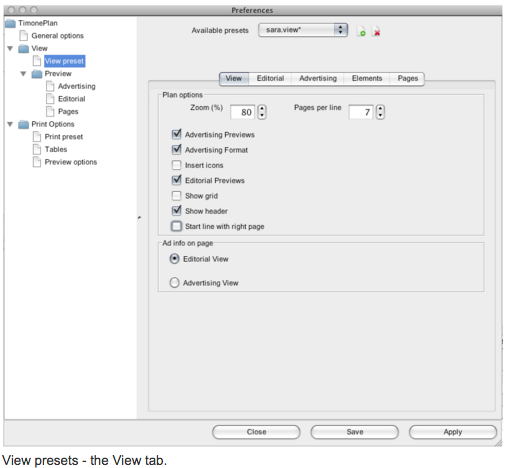
Zoom: shows the zoom level. The default level is 100% but it can be set as high as 5000% and as low as 25%;
Pages per line: number of pages per each line. The default number is 16, nut it can be as low as 1. Moreover, if you want you can see all the pages on the same line;
Advertising previews: this option enables you to show/hide advertising previews. By default, it is enabled;
Editorial previews: this option enables you to show/hide editorial previews. By default, it is enabled;
Advertising format: this option enables you to chose the advertising format.
Show grid: this option shows/hides grid lines on the Plan. By default, it is enabled;
Insert icons: this option shows/hides the Insert icons on the Plan. By default, it is enabled;
Show headers: this option shows/hides the header panel on top of the Plan. By default, it is enabled;
Ad info on page: this option allows to focus on Editorials (Editorial View) or Adverts (Advertising View). By default, it is set up Editorial View.
Start line with right page: this option allow to show editorial with right page
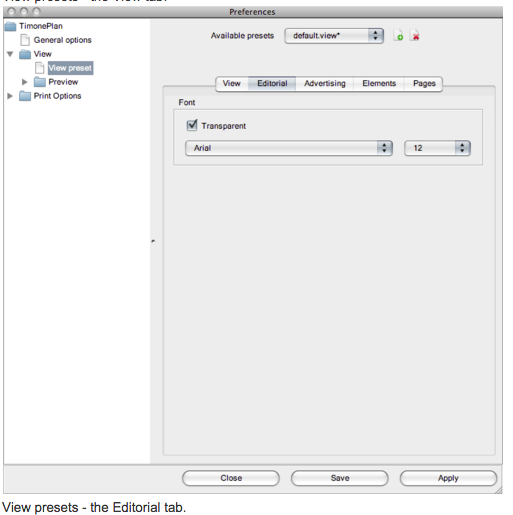
EDITORIAL TAB (FONT):
- Transparent:
Font type: this options allows to select a Font Type for the text displayed;
Font size: this options allows to select a Font Size for the text displayed.
ADVERTISING TAB:
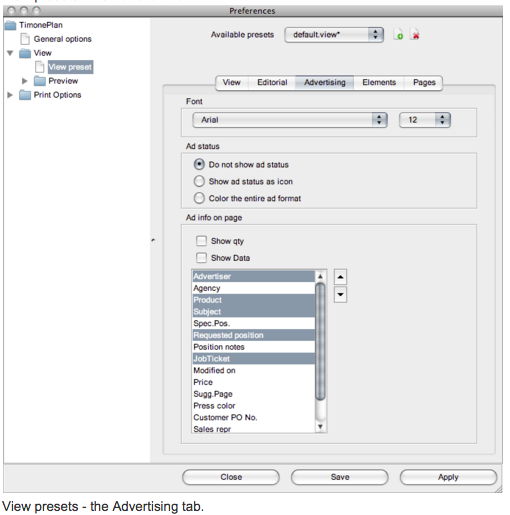
Font:
Font type: this options allows to select a Font Tipe for the text displayed;
Font size: this options allows to select a Font Size for the text displayed.
Ad status: this option allows to choose how to display the ad status:
Do not show Ad status: the Ad status is not shown;
Show Ad status as icon: the Ad status is shown as an icon inside the advert;
Color the entire Ad format: the Ad status is shown by coloring the entire ad format.
Ad info on page:
Show quantity;
Show data.