| HTML |
|---|
<script type="text/javascript">
<!--
function tell_toggle_visibility(id) {
var e = document.getElementById(id);
if(e.style.display == 'block')
e.style.display = 'none';
else
e.style.display = 'block';
}
//-->
</script>
<a href="#">
<img style="-webkit-user-select:none; display:block; margin:auto;" src="http://docs.tellnet.it//download/attachments/9798103/SMALL+BANNER.jpg?version=1&modificationDate=1477922382210" align="left" onclick="tell_toggle_visibility('tell_video');">
</a>
<br style="clear: both;">
<div style='display:block'></div>
<div id="tell_video" style='display:none'>
<iframe width="960" height="540" src="https://www.youtube.com/embed/2zWSs2OSvws?rel=0&showinfo=0" frameborder="0" allowfullscreen></iframe>
</div> |
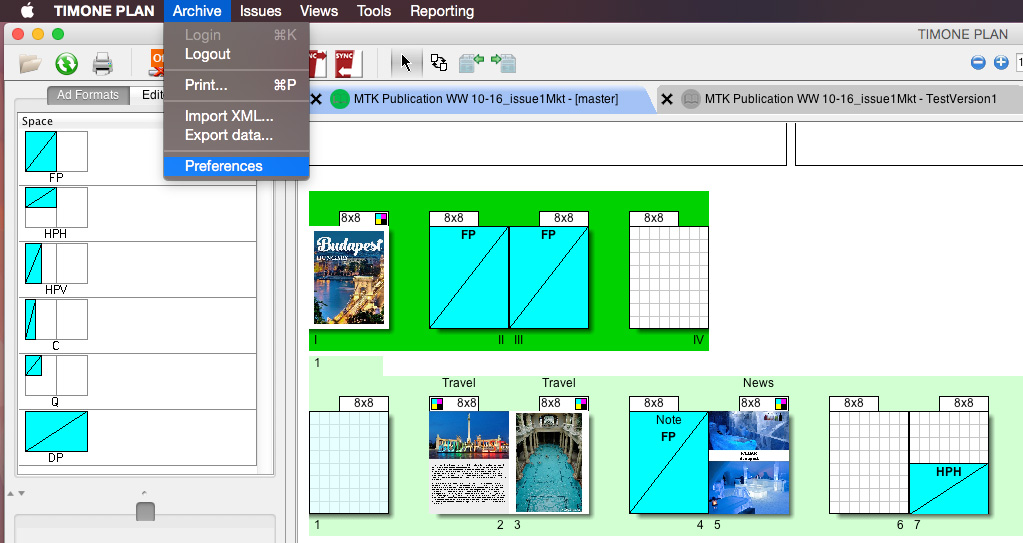
To set up User Preferences, you have to:
1) Click on “Archive”
2) Select “Preferences“ in the Menu Bar at the top of the screen, both for Microsoft Windows and Apple Mac OS X.
GENERAL OPTIONS:
General Options Panel, allows to define general view options. Thanks to it, it is possible to set:
| Option | Description |
|---|---|
| Units of measure and increments | |
| Units of Measure | deal with the unit of measure used in the Plan. It can be set to millimeters (mm), Inches or Points (Pts) |
| Keyboard increment | |
| Grid snap area | |
| Issue modification check | |
| Enable Modification Check | it enables a check for all the modifications made into in the Plan. Each modification will be notified: a notification will be displayed in the notification area at the bottom of the Plan |
| Check Interval | this option allows the user to select the interval between checks for modifications in the Plan (in seconds) |
...